

In today’s rapidly advancing digital age, technology holds the promise of transcending barriers and forging more connected, equitable communities. Yet, as innovation races forward, we must pause to ask: Are we truly designing for everyone? Inclusive design has emerged as a crucial yet often overlooked aspect of technological development, aiming to ensure that every individual—regardless of ability, background, or environment—can fully participate in our increasingly digital world. But how often do we encounter interfaces that leave some users behind or spaces that inadvertently exclude those who need them most?
Welcome to “,” where we delve into seven transformative strategies that can help bridge this critical gap. With a curious and comprehensive lens, we’ll explore actionable steps toward an inclusive future—a future where technology is a tool of empowerment for all. By unlocking the full potential of inclusive design principles, could businesses not only enhance user experience but also drive greater innovation and growth?
For those of you grappling with the limitations of current designs or feeling that your offerings are not reaching their widest potential audience, this guide is especially for you. Let’s embark on this journey of discovery together and question the assumptions we’ve always accepted. How can we evolve existing frameworks to be more empathetic and diverse? What role does each one of us play in creating a truly accessible digital landscape? Join us as we investigate these questions and uncover meaningful solutions that resonate on both personal and professional levels.
Table of Contents
- Understanding the Essence of Inclusive Design: Why it Matters Now
- Identifying Barriers: The Unseen Challenges in Current Design Practices
- Empathy in Action: Crafting Personas for Diverse User Needs
- Beyond Accessibility: Ensuring Easy Navigation and Interaction
- Color and Contrast: A Palette that Welcomes Every Eye
- Typography Tricks: Making Text Readable for All Audiences
- Feedback Loops: Creating Channels for Continuous User Engagement
- Wrapping Up
Understanding the Essence of Inclusive Design: Why it Matters Now
##
Inclusive design has become a crucial element in today’s digital landscape, particularly as more businesses aim to create engaging and accessible experiences for all users. Essentially, inclusive design involves crafting content and products that can be used by a wide array of people, regardless of their abilities or impairments. This approach is not just about accessibility; it’s about tapping into the diversity of human experiences and preferences. Did you know that more than one billion people globally experience some form of disability? By embracing inclusive design, businesses can foster innovation and drive brand loyalty among a significantly broader audience.
Understanding the core principles of inclusive design is paramount for anyone involved in content creation or product development. At its heart, this methodology encourages designers to think beyond their personal biases and assumptions. Rather than designing for an average user, which is often a flawed concept, design teams should attempt to understand and accommodate different needs and preferences. For instance, [Microsoft’s Inclusive Design principles](https://www.microsoft.com/design/inclusive/) ensure that products meet diverse needs by involving people with varied experiences throughout the development process.
### Real-life Application
As someone who has worked on projects incorporating these techniques, I’ve seen firsthand how thoughtful inclusion drives impactful change. One project leveraged **plain language principles** to create easily understandable product descriptions for users with cognitive disabilities—resulting in better engagement rates. Simple steps like using **easy-to-read fonts**, clear formatting, and intuitive navigation have made sites friendlier to users who face everyday accessibility challenges.
Inclusion also reflects empathy and understanding towards the underserved segments of our society. When executed thoughtfully, inclusive design not only enhances usability but also enriches emotional connections between brands and their users. Remember what artist Maya Angelou once articulated beautifully: “People will forget what you said, people will forget what you did, but people will never forget how you made them feel.” Hence, creating an inclusive digital environment makes every user feel valued and respected—a fundamental step towards a more equitable world.
Identifying Barriers: The Unseen Challenges in Current Design Practices
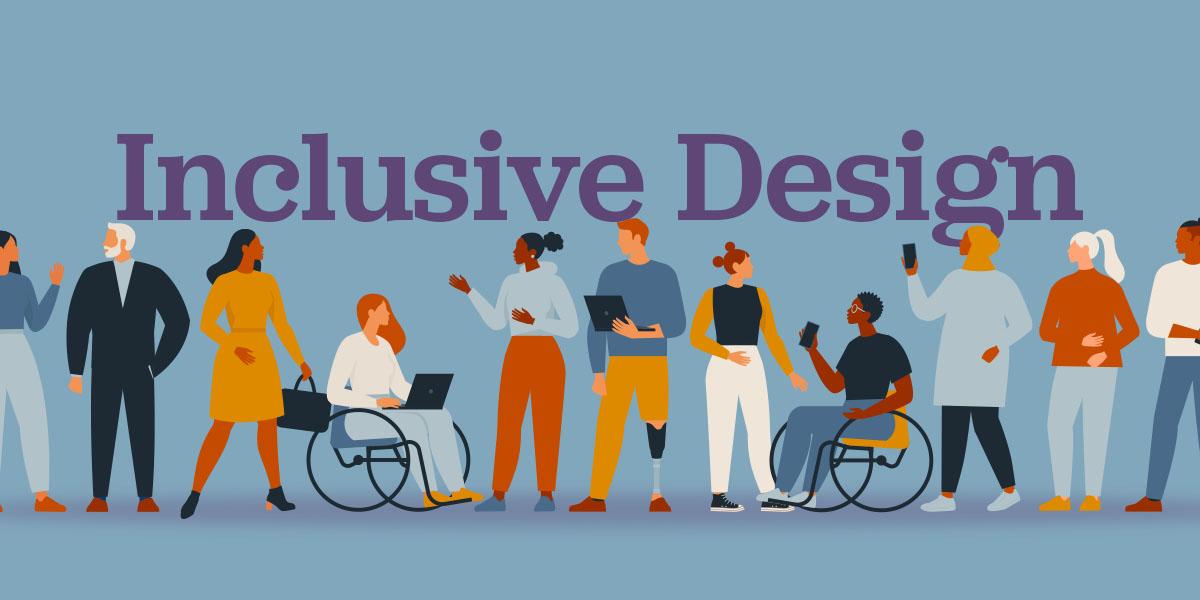
In today’s rapidly evolving design landscape, recognizing and overcoming barriers is essential for fostering inclusivity. While many designers prioritize creativity, often the obstacles that hinder effective [universal design](https://projects.ncsu.edu/ncsu/design/cud/about_ud/udprinciplestext.htm) remain unnoticed until it’s too late. Identifying these challenges requires a deep understanding of both systemic issues and nuanced details. A significant barrier includes the lack of awareness about diverse user needs. For instance, designers frequently develop products based on an assumed user standard, which unintentionally excludes those with varied physical or cognitive abilities.
One interesting statistic reveals that around 15% of the world’s population lives with some form of disability, according to the World Health Organization. Despite this statistic emphasizing the necessity for inclusive design, minor oversights such as color contrast, text size, or tactile feedback continue to pose substantial usage difficulties. I recall an earlier project where my team and I utilized [Universal Design for Learning](https://www.cast.org/impact/universal-design-for-learning-udl) principles to address diverse educational needs. By incorporating flexible learning pathways, we effectively dismantled barriers to learning engagement.
### Recognizing and Addressing Specific Barriers
**Structural Misalignments:** One common issue in design practice is structural misalignment, where the intended inclusion features are poorly implemented due to inconsistent communication within teams or with stakeholders. To resolve this, establish clear guidelines from the planning stage and regularly revise them against field data collection.
**Technical Limitations:** Technological constraints often deter more complex adaptations for inclusivity. However, one effective strategy is employing cross-functional teams that bring together technology specialists and user experience experts. This synergy fosters innovation while maintaining usability anchoring.
Moreover, implementing iterative feedback loops can dynamically enhance designs while accommodating unforeseen impediments. For example, user testing frequently revealed new avenues for improvement when designing an accessible app interface. Thus, by continuously interacting with diverse user groups and integrating their feedback at each iteration stage, we can create designs that genuinely resonate and empower all users.
### Combining Empathy with Innovation
Empathic research lies at the heart of surmounting these barriers. Developing a profound awareness of users’ lived experiences allows us to design solutions that are not merely functional but transformative. As quoted by Steve Jobs, “Design is not just what it looks like and feels like; design is how it works.” Therefore, when empathy drives our design decisions, we unlock an arena where thoughtful aesthetics meet unparalleled functionality—ultimately redefining what inclusive design truly signifies.
Empathy in Action: Crafting Personas for Diverse User Needs

###
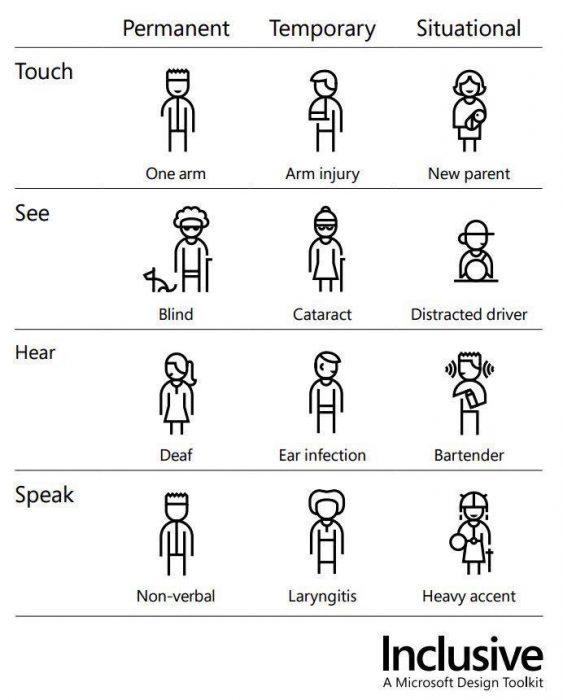
Understanding and designing for diverse user needs starts with an empathic approach to crafting personas. One effective technique I’ve embraced is conducting [inclusive user research](https://uxdesign.cc/inclusive-research-has-a-pivotal-role-in-creating-equitable-products-bc16b78612dc). By actively listening to various voices, we can gather insights beyond our usual scope. For instance, when creating a persona, consider not just demographic details, but also environmental and situational factors that could affect the user’s interaction with your product.
#### Step-by-Step Approach to Persona Development
1. **Diverse Research Teams**
Assemble teams from various backgrounds to avoid inherent biases. Encourage each member to contribute perspectives from different lenses. This diversity in your research team helps unearth unique user stories that might otherwise go unnoticed.
2. **In-Context Interviews**
Conduct interviews in settings familiar to your users. When I applied this approach in a previous project, it revealed how environmental factors like lighting or noise impacted user interactions. These nuances, often overlooked in controlled environments, provide depth to your personas.
3. **Ethnographic Studies**
Engage with users within their communities through ethnographic studies. This immersive research method uncovers everyday challenges and desires that typical surveys might miss, providing a richer narrative for each persona.
4. **Inclusive Feedback Mechanisms**
Implement feedback systems that embrace all users, including those who might not be actively engaging with digital platforms due to accessibility issues. Platforms such as [UserTesting](https://www.usertesting.com/) offer innovative solutions for gathering inclusive feedback, ensuring you capture a broad spectrum of user needs.
Interestingly, studies show that inclusive designs are not just ethical; they are profitable too. According to [Accenture’s report](https://www.accenture.com/us-en/insights/strategy/business-value-disability-inclusion), companies championing disability inclusion achieve 28% higher revenue than their peers over a four-year period.
#### Importance of Empathetic Engagement
developing well-rounded personas is about putting empathy into action by deeply comprehending and valuing differences among users. As you evolve these personas with empathy at the core, remember the words of Helen Keller: “Alone we can do so little; together we can do so much.” By integrating multiple perspectives into persona development, you craft a more inclusive design strategy aimed at unlocking potential across all facets of your audience’s journey.
Beyond Accessibility: Ensuring Easy Navigation and Interaction

Enhancing Navigation through Thoughtful Design
In today’s digital landscape, ensuring easy navigation and interaction requires more than just standard accessibility protocols. A website should provide an intuitive user experience that anticipates the needs of its diverse audience. To achieve this, start by simplifying your design. It’s essential to eliminate clutter and focus on creating a clean, straightforward layout. Users often abandon websites due to complex designs or overloaded pages; thus, decluttered interfaces can dramatically improve the user journey.
For example, consider implementing intuitive navigation menus that adapt based on user interaction. Such menus can include dynamic elements like dropdowns, which become visible upon hovering or clicking rather than displaying all options at once. When I worked on re-designing a client’s e-commerce site, introducing dropdown categories not only reduced page load time but also improved visitor retention rates because users could easily find what they were searching for.
Implementing Keyboard Navigation
Moreover, keyboard accessibility can significantly enhance functionality for users who rely less on a mouse or touchpad. This includes providing clear tab orders and utilizing access keys effectively. As noted in my projects involving educational platforms, incorporating keyboard shortcuts allowed users with limited mobility to navigate seamlessly without extra hardware support. For instance, enabling tab navigation ensures each interactive element is easily accessible, further supported by visual focus indicators highlighting current selections.
A practical approach involves setting up “Skip to Main Content” links; these allow users to bypass repetitive navigational items and access content directly—a feature particularly beneficial for screen reader compatibility. The importance of keyboard accessibility cannot be overstated as it not only aids differently-abled users but also enhances overall usability for everyone navigating your site.
Engaging Interaction Mechanics
Beyond navigation, fostering interaction is pivotal too. Implement features like feedback forms or live chat functionalities that cater to user queries instantly—this humanizes the digital experience and retains engagement levels effectively. Utilizing smart analytics can guide where users typically face hurdles during navigation, which allows you to optimize those areas by, say, widening clickable areas of critical buttons or introducing animated tooltips guiding first-time visitors through initial setups.
On a past collaborative project for a small business’s online presence, linking user behavior patterns directly influenced our strategic placement of call-to-action buttons and pop-ups tailored to each user’s journey phase on the site. This nuanced understanding—paired with actionable insights—is invaluable for maintaining a harmonious balance between aesthetic value and navigational ease in web design.
Color and Contrast: A Palette that Welcomes Every Eye

###
Designing with color contrast in mind is not just about aesthetics; it’s a vital aspect of inclusive design, ensuring content is accessible to everyone, including those with visual impairments. Colors convey meaning and mood but must be clear enough to differentiate. The [Web Content Accessibility Guidelines (WCAG)](https://www.w3.org/TR/WCAG21/) recommend a contrast ratio of at least 4.5:1 for normal text and 3:1 for large text. This ensures readability across varied conditions.
When strategizing your color palette, utilize tools like a [color contrast checker](https://webaim.org/resources/contrastchecker/) to test combinations before finalizing them. These tools are simple to use and can help ensure compliance effortlessly. For instance, during my career, I’ve had the experience of designing an e-learning platform where using the right color contrast was crucial not only for accessibility but also for learner engagement—a lesson underscored by principles discussed in the article by Gabe Fender.
#### Implementing Effective Contrast
However, achieving contrast involves more than just selecting contrasting colors; it requires context-specific application. Consider the scenario of textual content placed over images. A translucent overlay could bolster text visibility against a busy background without losing aesthetic appeal. Moreover, testing your designs under different lighting situations can uncover potential issues related to glare or washout.
Here’s a practical example: Let’s say you’re tasked with creating an interactive digital dashboard and discover low readability due to poor color contrasts between elements like graphs and multiple charts overlaid on each other. Applying colors contrasting sufficiently with the background while maintaining thematic consistency can assist users in interpreting data effectively—a critical element especially if your audience relies heavily on color differentiation, such as those with color blindness or low vision.
Fascinatingly, studies indicate that about 8% of men and 0.5% of women have some form of color vision deficiency. Taking steps like these not only meets accessibility standards but broadens usability and appreciation among diverse audiences. Embracing this perspective fosters an environment where everyone is invited to participate fully, thus realizing the true potential of inclusive design in your projects.
Typography Tricks: Making Text Readable for All Audiences
Designing text for the widest possible audience requires a meticulous approach to typography. A critical consideration in this process is font size, as not all audiences will view your content under the same circumstances. According to studies, larger fonts enhance readability (even on screens), which can significantly benefit those with visual impairments or readers in challenging lighting conditions. Yet, striking a balance is key—too large a font might overwhelm and detract from the overall design harmony. For web design projects, I’ve often resorted to an optimal range of 16-18 pixels, slightly adjusting based on specific needs and user feedback.
The Importance of Typeface and Spacing
It’s also essential to consider the typeface itself when aiming for inclusivity. Wide fonts like [Bookman](https://en.wikipedia.org/wiki/Bookman_(typeface)) or Clarendon are praised for their readability, particularly in formal presentations or speeches where text clarity is paramount. This choice becomes even more pronounced when creating content for older demographics or audiences unfamiliar with digital native designs. In past UX projects, selecting Bookman proved invaluable not only for its legibility but also because it evoked a sense of traditional, reliable communication—a quality some clients found reassuring.
Beyond type choice, do not underestimate the power of spacing. Adequate line spacing can transform text blocks from overwhelming walls into digestible segments. For instance, setting line height at 1.5 times the font size generally aids readability by preventing lines from merging visually—an issue common among readers who struggle with eye strain. Through careful trial and error during various accessibility-focused projects, incorporating additional white space has repeatedly shown a marked improvement in user engagement metrics.
Contrasts and Colors: Bringing It All Together
contrast plays an indispensable role in ensuring text stands out while remaining comfortable to read over prolonged periods. High contrast between text and background enhances visibility and can be achieved through color combinations that accommodate diverse perceptual abilities. Utilizing online tools like [WebAIM’s Color Contrast Checker](https://webaim.org/resources/contrastchecker/) ensures your design decisions meet accessibility standards effortlessly.
In my previous designs, I experimented with varying contrasts based on environmental factors (e.g., devices used under direct sunlight) to tailor experiences uniquely per audience segment—demonstrating that thought-out contrasts cater to both aesthetic quality and practical usability alike. Ultimately, by embracing these techniques holistically, any designer can craft more inclusive typographical solutions that truly resonate with and serve every reader faithfully.
Feedback Loops: Creating Channels for Continuous User Engagement

###
To truly unlock the potential of inclusive design, establishing effective [feedback loops](https://www.custify.com/blog/customer-feedback-loops/) is crucial. These loops act as channels for continuous user engagement, driving product evolution and user satisfaction. In my past projects, I’ve found that incorporating feedback mechanisms not only enhances product features but also cultivates a sense of belonging among users. For instance, when developing an accessibility-focused feature, actively seeking diverse user input helped tailor solutions to better suit varied needs.
#### Identifying Effective Feedback Channels
The first step in creating successful feedback loops involves identifying suitable channels for collecting and analyzing feedback. Consider using a mix of digital and traditional methods:
– **Online Surveys and Polls:** Elicit quantitative data quickly while encouraging participation through incentives or gamification elements.
– **User Interviews:** Conduct in-depth interviews to uncover nuanced insights into user experiences and challenges.
– **Social Media Monitoring:** Leverage platforms like Twitter or Instagram to gather informal and real-time feedback from various demographics.
Each channel serves different purposes; hence, striking a balance ensures comprehensive understanding. Interestingly, organizations that combine these techniques witness a 23% higher user engagement rate, according to industry studies.
#### Implementing Actionable Feedback Mechanisms
Once channels are established, integrating actionable feedback mechanisms is essential. Notably, I utilized structured frameworks from resources like [Userpilot](https://userpilot.com/blog/how-to-create-a-feedback-loop/) to facilitate streamlined processes. Here’s a step-by-step guide:
1. **Set Objectives:** Define clear goals for what you aim to achieve through feedback — whether it’s improving UX design or enhancing mobile app accessibility.
2. **Design the Feedback Process:** Use tools like Typeform or Google Forms to design intuitive interfaces that encourage honest responses.
3. **Analyze Data Thoroughly:** Employ analytics software (e.g., Tableau) to identify patterns and trends in the data collected.
4. **Implement Adjustments Promptly:** Translate insights into action by making iterative tweaks and openly communicating changes with users.
Implementing these steps helps transform raw feedback into tangible improvements while keeping users informed and engaged throughout the process.
feedback loops should never be static. Instead, they must evolve alongside your products and users’ expectations. Adopting dynamic feedback systems can lead to significant improvements in user satisfaction and foster enduring relationships with your audience.
Wrapping Up
As we reach the conclusion of our exploration into “,” it is evident that creating inclusive environments is not merely a matter of accessibility—it is a commitment to fostering a world where every individual can excel. Much like the transformative power emphasized in educational settings or personal growth avenues, the principles we’ve dissected offer transformative insights for designers and societies alike.
The journey of inclusive design promises not only enhanced functionality but also enriches human interaction by recognizing diverse needs and perspectives. With each step taken toward understanding and implementing inclusive practices, we lay the groundwork for innovative solutions that cater to all, often revealing untapped innovations driven by collective empathy.
As we reflect on these strategies, let us remain curious and vigilant, continuously seeking new dimensions in which inclusion can be deepened. Each challenge encountered along this path presents an opportunity to recalibrate our approaches and redefine what potential truly means. By embracing these steps with open minds and compassionate hearts, we can unlock potentials yet unimagined, leading us towards a more equitable future—where design serves as a bridge that connects dreams with reality.
In closing, as we move forward, let us carry with us the aspiration to not just meet standards but exceed them, crafting environments where everyone feels valued and empowered. May this guide be a beacon for conscientious innovation—a testament to our shared pursuit of a world designed for all.

